
An online typing test is a simple way to measure how quickly and accurately you can type. Whether you are a student, job seeker, professional or competitive-exam aspirant, understanding your typing speed can help you identify areas for improvement and build better digital skills.
Typing speed is commonly measured in Words Per Minute (WPM), while accuracy shows how consistently you type the given content without making mistakes. By combining regular typing practice with measurable results, you can gradually improve both speed and accuracy.
TypingOn makes this process simple by bringing online typing tests, real-time performance measurement, typing practice, results, rankings and a free typing certificate together in one platform.
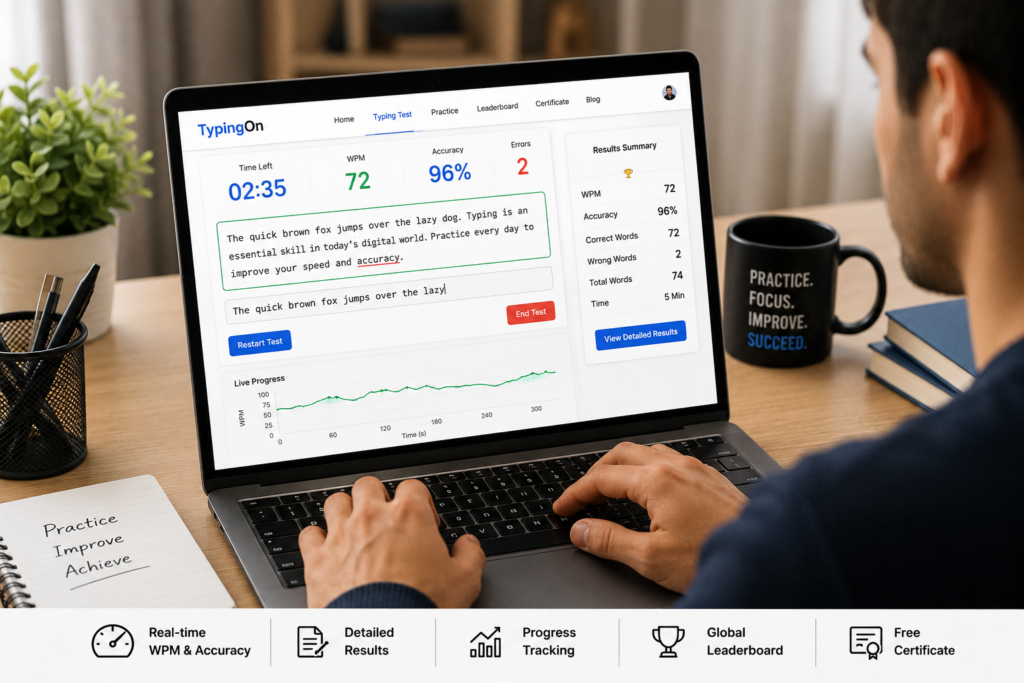
What Is an Online Typing Test?
An online typing test measures your keyboard performance by asking you to type a passage within a specific time.
Instead of installing software, you can access the test through your browser and start practising.
A typical assessment can measure:
- Words Per Minute (WPM)
- Typing speed
- Accuracy
- Correct characters
- Incorrect characters
- Errors
- Test duration
- Overall performance
The purpose isn’t simply to type as fast as possible.
A good result combines speed with accuracy.
For example, typing 70 WPM may look impressive, but if you make frequent mistakes, your practical productivity may be lower than someone typing 55 WPM with 98% accuracy.
Why Take a Typing Test Online?
Regular assessment gives you something that ordinary practice cannot: measurable feedback.
Instead of asking yourself whether your typing is improving, you can compare your results over time.
An online test can help you:
- Establish your current WPM
- Measure typing accuracy
- Identify frequent mistakes
- Set realistic improvement goals
- Monitor progress
- Prepare for typing assessments
- Build confidence
- Understand your keyboard skills
TypingOn provides different test durations, including 30 seconds, 1 minute, 3 minutes and 5 minutes, allowing users to choose a session according to their practice requirements.
What Is WPM in a Typing Speed Test?
WPM means Words Per Minute.
It is one of the most common measurements used to describe typing speed.
Your WPM provides an indication of how quickly you can enter text during a particular test.
However, WPM should always be considered alongside accuracy.
For example:
| Performance | WPM | Accuracy |
|---|---|---|
| Example A | 45 | 99% |
| Example B | 55 | 94% |
| Example C | 70 | 82% |
The fastest result isn’t automatically the best result.
For professional typing, data entry and documentation, accuracy and consistency can be just as important as speed.
Typing Speed and Accuracy: Why Both Matter
Imagine entering customer information into a spreadsheet.
If you type slowly, the task may take longer.
But if you type quickly and enter incorrect information, you may create additional work by having to find and correct those mistakes.
That’s why effective typing involves balancing:
Speed + Accuracy + Consistency
TypingOn allows users to monitor their speed and accuracy while completing their assessment and review their performance afterward.
How to Improve Your Typing Speed
Taking a test is only the first step.
The real benefit comes from using your results to improve.
1. Practise Regularly
A short practice session every day can be more useful than one long session once a week.
2. Focus on Accuracy
Don’t immediately try to increase WPM.
First reduce unnecessary errors.
3. Learn Touch Typing
Try to develop the ability to type without constantly looking at your keyboard.
4. Maintain Proper Finger Position
Correct finger placement can make keyboard movement more efficient.
5. Practise Difficult Words
If you repeatedly make mistakes with particular letters or combinations, practise those patterns separately.
6. Track Your Results
Keep an eye on your WPM and accuracy so you can identify long-term improvement.
7. Gradually Increase Your Target
If you consistently type at 40 WPM, don’t immediately aim for 100 WPM.
Set achievable milestones such as:
40 → 45 → 50 → 55 WPM
while maintaining good accuracy.
Typing Practice for Students, Freshers and Professionals
Typing is an important digital skill across many environments.
Students
Students can use typing practice for assignments, projects, online learning and computer-based examinations.
Job Seekers
Candidates applying for administrative, data-entry, customer support, operations and back-office positions can benefit from stronger keyboard skills.
Professionals
Employees frequently use keyboards for:
- Emails
- Reports
- Spreadsheets
- Documentation
- Data entry
- CRM systems
- Research
- Business communication
Better keyboard efficiency can help professionals complete routine computer-based tasks more comfortably.
Competitive Exam Aspirants
Candidates preparing for typing-based examinations can use timed practice to become more comfortable working under pressure.
English Typing Test and Typing Practice
An English typing test can help users measure their ability to type English words, sentences and punctuation accurately.
English typing skills are particularly useful for professionals working in environments where English is commonly used for emails, documentation, reports and digital communication.
If you are preparing for a specific examination, always check its official requirements because typing speed, language and keyboard layout requirements can differ.
Take a Free Online Typing Test with TypingOn
If you want to check your typing speed and accuracy without complicated software, TypingOn provides a free online platform designed for typing assessment and practice.
TypingOn is part of EPS Group (Elevate Prime Solutions) and is designed to help students, job seekers, professionals and typing enthusiasts test, practise, improve and showcase their typing abilities.
With TypingOn, users can access features including:
- Free online typing tests
- Real-time typing speed measurement
- WPM results
- Typing accuracy tracking
- Performance measurement
- Detailed typing results
- Live global leaderboard
- Typing practice resources
- Free typing certificate
TypingOn currently offers multiple test-duration options, allowing users to choose shorter or longer sessions depending on their practice goals.
Start Your Test
👉 Take a Free Online Typing Test on TypingOn
Check your current speed, measure your accuracy and use the result as your starting point for improvement.
Compete on the TypingOn Live Leaderboard
Practice doesn’t have to be completely individual.
TypingOn includes a live leaderboard where users can compare their performance and work toward a higher ranking.
A leaderboard can add an element of competition to practice.
Instead of only asking:
“How fast can I type?”
you can also set goals such as:
- Improve my WPM
- Increase my accuracy
- Reduce errors
- Beat my previous score
- Move higher on the leaderboard
This can make repeated practice more engaging.
Free Typing Certificate from TypingOn
TypingOn also provides a free typing certificate after completing the applicable assessment.
The certificate can showcase relevant performance information such as typing speed, WPM and accuracy.
It can be useful for:
- Students
- Freshers
- Job seekers
- Data-entry candidates
- Office professionals
- Administrative candidates
- Customer-support professionals
A certificate shouldn’t replace practical ability, but it can be an additional credential when building your digital-skills profile.
👉 Take your typing test and explore your TypingOn result and certificate
How Often Should You Practise Typing?
You don’t need to spend hours every day.
A consistent routine can be more effective.
Try:
10–15 minutes daily
During each session:
- Take a short test.
- Check your WPM.
- Review your accuracy.
- Identify mistakes.
- Practise again.
- Compare your results.
Over time, look at your average performance rather than judging yourself based on one result.
Your goal should be steady improvement.
What Is a Good Typing Speed?
There is no single WPM that is perfect for everyone.
Typing speed requirements can vary depending on the activity and profession.
TypingOn’s own guidance notes that 40–50 WPM can be considered good for regular users, while professional roles may require higher speeds depending on their requirements.
Rather than comparing yourself with someone else, establish your current baseline.
For example:
Starting point: 38 WPM / 91% accuracy
First target: 45 WPM / 95% accuracy
Next target: 50 WPM / 97% accuracy
This makes your progress measurable.
Frequently Asked Questions
Is TypingOn free?
Yes. TypingOn provides free online typing practice and speed-testing features.
How can I check my typing speed?
Start a test, type the displayed content and review your WPM, accuracy and performance results.
What does WPM mean?
WPM means Words Per Minute and is commonly used to measure typing speed.
Is typing accuracy important?
Yes. Speed without accuracy can lead to additional corrections and reduced productivity.
Can I practise typing online?
Yes. TypingOn provides an online environment for practising and improving typing speed and accuracy.
Can I get a free typing certificate?
Yes. TypingOn provides a free typing certificate for applicable completed assessments.
Can I compare my typing performance with other users?
Yes. TypingOn includes a live leaderboard where users can compare their performance and work toward higher rankings.
Start Your Typing Journey with TypingOn
Improving your typing skills isn’t about chasing a high WPM for one test.
It’s about building speed, accuracy, consistency and confidence over time.
Whether you’re a student preparing for an examination, a job seeker developing employability skills or a professional looking to improve digital productivity, regular typing practice can help.
Start by measuring your current performance.
Then practise, track your results and improve one step at a time.
Test. Practise. Compete. Certify.
Start your free online typing test with TypingOn and check your WPM, accuracy and typing performance today.